



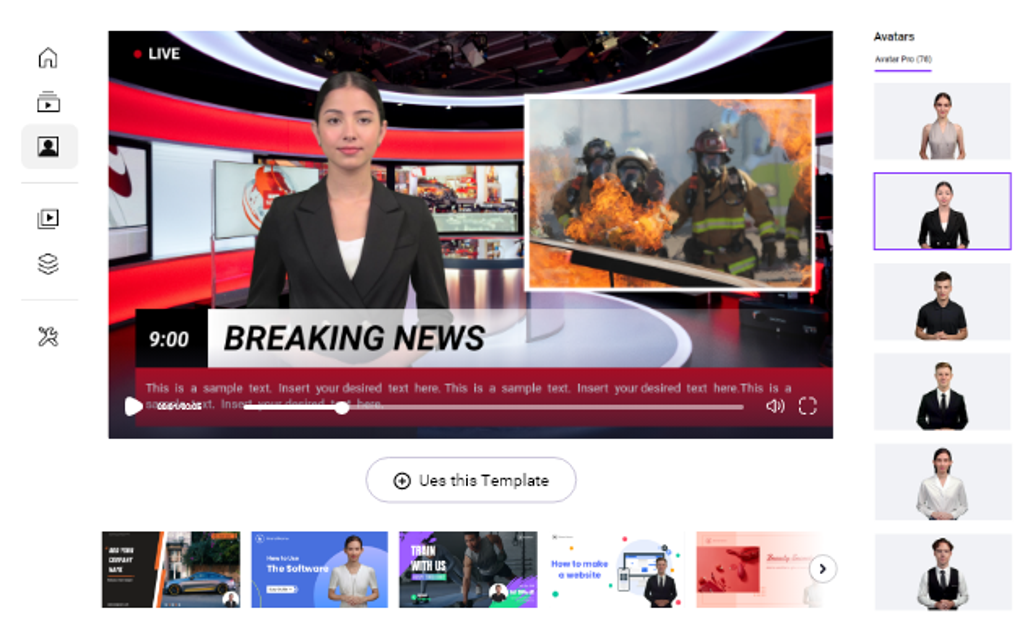
Description
Download Vidnoz AI – AI‑Powered Video Editor, Free Templates & Realistic Avatars
Overview
Vidnoz AI is a next‑generation video editing platform that blends traditional editing tools with cutting‑edge artificial intelligence. Designed for marketers, educators, content creators, and casual users, the software promises to turn raw footage into polished, professional‑looking videos in a matter of minutes. By leveraging machine‑learning algorithms, Vidnoz AI automates layout decisions, visual effects, and voice‑over generation, removing the steep learning curve that usually accompanies video production. Whether you need a promotional clip for a product launch, a tutorial for an online course, or a social‑media story that stands out, Vidnoz AI offers a rich library of more than 300 pre‑designed templates and a growing collection of over 100 lifelike avatars. The platform also supports 100+ AI‑generated voices across 23 languages, making it a truly global solution. In addition to standard editing functions, the suite includes a Talking Avatar, Text‑to‑Speech, Background Remover, and a Cartoon Generator, each powered by proprietary vision technology. The result is a highly intuitive, drag‑and‑drop environment where users can focus on storytelling rather than technical details.
The core value proposition of Vidnoz AI lies in its ability to democratize video creation. No prior editing experience is required; the AI suggests scene transitions, color grading, and even music that matches the mood of your footage. For businesses looking to scale content output, the software’s batch processing capabilities allow multiple videos to be rendered simultaneously, saving both time and resources. Security is also a priority: all uploads are encrypted, and the platform adheres to GDPR standards, ensuring that sensitive brand assets remain protected.
Overall, Vidnoz AI positions itself as a “one‑stop shop” for video production, merging creativity with efficiency. Its subscription model includes a free tier with limited exports, while paid plans unlock unlimited renders, premium templates, and priority support. In the sections that follow, we’ll dive deeper into the feature set, walk through installation, explore compatibility, and weigh the pros and cons to help you decide whether Vidnoz AI is the right tool for your next video project.
Key Features & AI‑Driven Tools
- 300+ professionally designed video templates covering marketing, education, entertainment, and social media.
- 100+ realistic AI avatars that can speak any of the 100+ AI‑generated voices in 23 languages.
- Talking Avatar – turn scripts into lifelike on‑screen presenters with synchronized lip‑sync.
- Text‑to‑Speech (TTS) – natural‑sounding voice‑overs with customizable speed, pitch, and emotion.
- Background Remover – AI detects and removes unwanted backgrounds without a green screen.
- Cartoon Generator – transform footage into stylized animation with a single click.
- Auto‑layout engine – AI suggests optimal scene order, transitions, and timing based on content analysis.
- Batch rendering – produce multiple video versions (different resolutions, languages, or branding) in parallel.
- Integrated media library – stock footage, music tracks, and sound effects royalty‑free.
- Collaboration workspace – share projects with team members, leave comments, and lock versions.
Beyond the obvious list of tools, Vidnoz AI’s AI engine continuously learns from user behavior. For example, if you frequently choose upbeat music for product demos, the system will prioritize similar tracks in future suggestions. The platform also offers a “Smart Caption” feature that automatically generates subtitles in the selected language, improving accessibility and SEO for online videos. All assets are stored in the cloud, which means you can switch between devices without losing progress.
One of the most compelling aspects is the integration of realistic avatars. These avatars can be customized with different outfits, hairstyles, and facial expressions, making them suitable for brand mascots or virtual instructors. Combined with multilingual TTS, a single video can be localized for up to 23 languages with just a few clicks, dramatically reducing translation costs.
From a productivity standpoint, the Background Remover eliminates the need for expensive lighting rigs or chroma‑key setups. Users simply upload their footage, select the subject, and let the AI isolate the foreground. The resulting clip can be placed onto any background—whether it’s a corporate office, a scenic landscape, or an animated scene—without visible artifacts. This flexibility is especially valuable for remote teams creating consistent brand videos from disparate locations.
In short, Vidnoz AI’s feature set is built around the idea of “AI‑first editing,” where automation handles the repetitive tasks and creative decisions are left to the user. This balance makes the software both powerful for seasoned editors and approachable for beginners.
Installation, Usage & Compatibility
Step‑by‑Step Installation
Downloading Vidnoz AI is straightforward. Visit the official website, click the Download button for your operating system, and follow these steps:
- Run the installer (VidnozAI‑Setup.exe for Windows or VidnozAI‑Installer.dmg for macOS).
- Accept the license agreement and choose the installation directory.
- Allow the installer to install required dependencies (Microsoft Visual C++ Redistributable on Windows or Homebrew packages on macOS).
- After installation, launch the application and create a free account using an email address or single‑sign‑on with Google/Apple.
- Verify your email, then log in to access the cloud‑based media library.
First‑Time User Experience
Upon first login, Vidnoz AI presents a guided tour that highlights the dashboard, template gallery, and AI tools. Users can start a new project by selecting a template or by uploading raw footage. The drag‑and‑drop interface lets you place video clips, images, and text onto the timeline. When you add a script, the Talking Avatar module appears, offering a list of avatars and voice options. Once the elements are arranged, click Generate and the AI will render a preview within minutes.
System Requirements & Operating Systems
Vidnoz AI supports the following platforms:
- Windows 10/11 (64‑bit) – Minimum 8 GB RAM, 2 GHz dual‑core CPU, and 2 GB free disk space.
- macOS 11 (Big Sur) or later – Minimum 8 GB RAM, Apple Silicon or Intel processor, and 2 GB free storage.
- iOS 13+ (iPad & iPhone) – Optimized for touch input, with cloud rendering to reduce device load.
- Android 8.0+ (tablet & phone) – Full feature set available via the Vidnoz AI mobile app.
The desktop versions run locally for preview editing but rely on cloud servers for final rendering, ensuring fast export times even on modest hardware. Mobile apps are fully functional, allowing you to record, edit, and publish directly from your phone. All data syncs in real time, so a project started on a laptop can be finished on a tablet without missing a beat.
Updates & Security
Vidnoz AI receives monthly updates that introduce new templates, avatar models, and AI enhancements. The application checks for updates automatically on launch, and users can opt for silent background installations. Security is handled through end‑to‑end encryption for file uploads, and the platform complies with GDPR and CCPA standards. Enterprise plans offer SSO integration and dedicated virtual private cloud (VPC) instances for added compliance.
Pros, Cons & Frequently Asked Questions
Pros
- AI‑driven automation drastically reduces editing time.
- Extensive library of templates, avatars, and AI voices.
- Multilingual support with 23 languages and regional accents.
- Cloud‑based rendering eliminates hardware bottlenecks.
- Background remover and cartoon generator add creative flexibility.
- Collaborative workspace streamlines team projects.
- Secure, GDPR‑compliant data handling.
Cons
- Free tier limits export resolution and number of renders per month.
- Heavy reliance on internet connection for rendering.
- Advanced custom effects may still require traditional editors.
- Learning curve for the AI customization options.
- Pricing can be high for small freelancers needing premium features.
FAQ – Your Questions Answered
Can I use Vidnoz AI without an internet connection?
The desktop editor works offline for basic trimming and timeline arrangement, but final rendering, AI avatar generation, and template downloads require an active internet connection.
What export formats does Vidnoz AI support?
Export options include MP4 (H.264), MOV, and GIF. Higher‑resolution exports (4K) are available on paid plans, along with custom bitrate settings.
Is there a limit on the number of avatars I can use per project?
No hard limit exists; however, free accounts can add up to three avatars per video. Paid subscriptions allow unlimited avatar usage.
How does the Text‑to‑Speech quality compare to human narration?
Vidnoz AI’s TTS engine uses neural networks that produce natural intonation, pauses, and emphasis. While it may not completely replace a professional voice actor for high‑budget productions, it is more than sufficient for tutorials, marketing clips, and internal communications.
Can I integrate Vidnoz AI with third‑party platforms like YouTube or Vimeo?
Yes. After rendering, the platform provides direct sharing links and API tokens for popular services, allowing one‑click uploads to YouTube, Vimeo, Facebook, and Instagram.
Overall Rating: 4.5 / 5
The combination of AI automation, a massive template library, and multilingual avatar support makes Vidnoz AI a standout choice for fast‑track video production. Its reliance on cloud rendering and subscription cost are the main trade‑offs, but for teams that need to churn out high‑quality content regularly, the investment pays off quickly.
Conclusion & Call to Action
Vidnoz AI redefines what a video editor can be by putting powerful AI capabilities at the fingertips of anyone who wants to create compelling visual stories. From its extensive collection of ready‑made templates and realistic avatars to the smart background remover and multilingual TTS, the platform removes the technical barriers that have traditionally limited video production to specialists. While a stable internet connection and a subscription fee are required for full functionality, the time saved on editing, the ability to produce localized content at scale, and the security assurances make it a worthwhile addition to any marketer’s or educator’s toolkit.
If you’re ready to accelerate your video workflow, increase production quality, and explore new creative possibilities without hiring a full‑time editor, download Vidnoz AI now. Start with the free plan to test the AI features, and upgrade when you need unlimited renders, 4K output, and premium avatar packs. Embrace the future of video creation—let Vidnoz AI do the heavy lifting while you focus on telling your story.
Guides & Tutorials for Vidnoz AI
How to install Vidnoz AI
- Click the Preview / Download button above.
- Once redirected, accept the terms and click Install.
- Wait for the Vidnoz AI download to finish on your device.
How to use Vidnoz AI
This software is primarily used for its core features described above. Open the app after installation to explore its capabilities.
User Reviews for Vidnoz AI 0
No reviews found





